
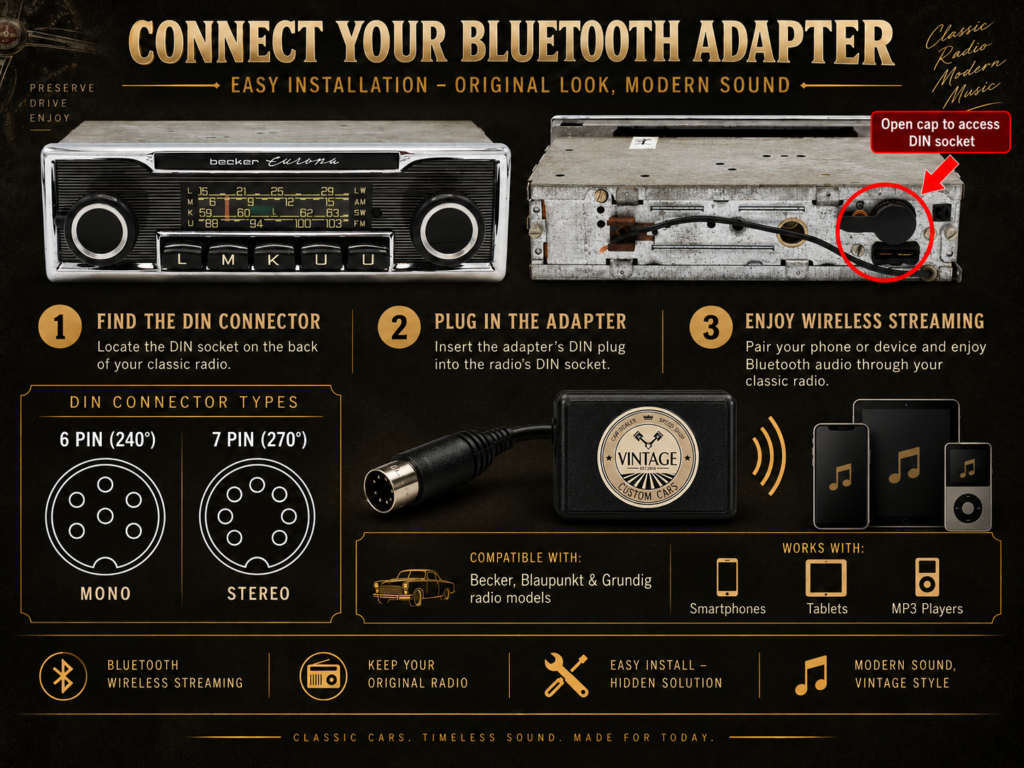
Not every, but most classic car radio models has a small connector on the back where accessories plug in – that’s where your Bluetooth adapter connects too. Identifying it takes less than a minute, with no tools required.
Step 1: Locate the DIN Socket
Turn your radio around, or reach behind the dashboard to the rear of the unit. You’ll find a small connector covered by a plastic cap — usually black or white — protecting a row of pins. This is the DIN socket.
Step 2: Open the Cap
Gently unclip or pull off the cap covering the connector. Underneath, you’ll see a circular arrangement of metal pins.
Step 3: Count the Pins
- 6 pins → You need our 6-Pin DIN Mono Adapter
- 7 pins → You need our 7-Pin DIN Stereo Adapter
As a general rule:
- 6-pin connectors are Mono — common on earlier Becker, Blaupunkt, and Grundig models
- 7-pin connectors are Stereo — found on most later Becker and Blaupunkt units
Still Not Sure?
If the cap is missing, damaged, or you’re simply unsure what you’re looking at, don’t guess. Send us a clear photo of the rear connector via WhatsApp or email, and we’ll confirm the correct adapter for your radio before you order — free of charge.
📱 WhatsApp: +370 645 32807 (24/7)
✉️ Email: info@vintagecustomcars.com
How to Connect Your Phone ⬇️